
- Front-end modernization is rarely just a simple framework migration. The real cost is the operational drag from undocumented business logic, dual-run stacks, and state re-architecture.
- Legacy codebases hide business rules in templates and scripts. Reverse-engineering them creates scope creep, delays, and higher engineering risk.
- Incremental migration lowers risk, but it introduces coexistence costs. Proxy routing, shared auth, duplicated pipelines, and parallel monitoring all require deliberate budget planning.
- The best approach is to audit first, then migrate in slices. Decide what not to modernize and keep the business live while changes are introduced gradually.
A strategic, route-by-route incremental migration (using patterns like the Strangler Fig) dramatically reduces risk compared to high-stakes "Big Bang" rewrites, which suffer high failure rates on large-scale software transformations.
Every engineering leader has heard the pitch: migrate the legacy front-end to a component-based framework and velocity will rise, hiring will get easier, and performance scores will jump. Sometimes that is true. But estimates are usually built from what is visible — pages, forms, modals, and design tokens — while most of the effort goes into what is not.
Every engineering leader has heard the pitch: migrate the legacy front-end to a component-based framework and velocity will rise, hiring will get easier, and performance scores will jump. Sometimes that is true. But estimates are usually built from what is visible — pages, forms, modals, and design tokens — while most of the effort goes into what is not.
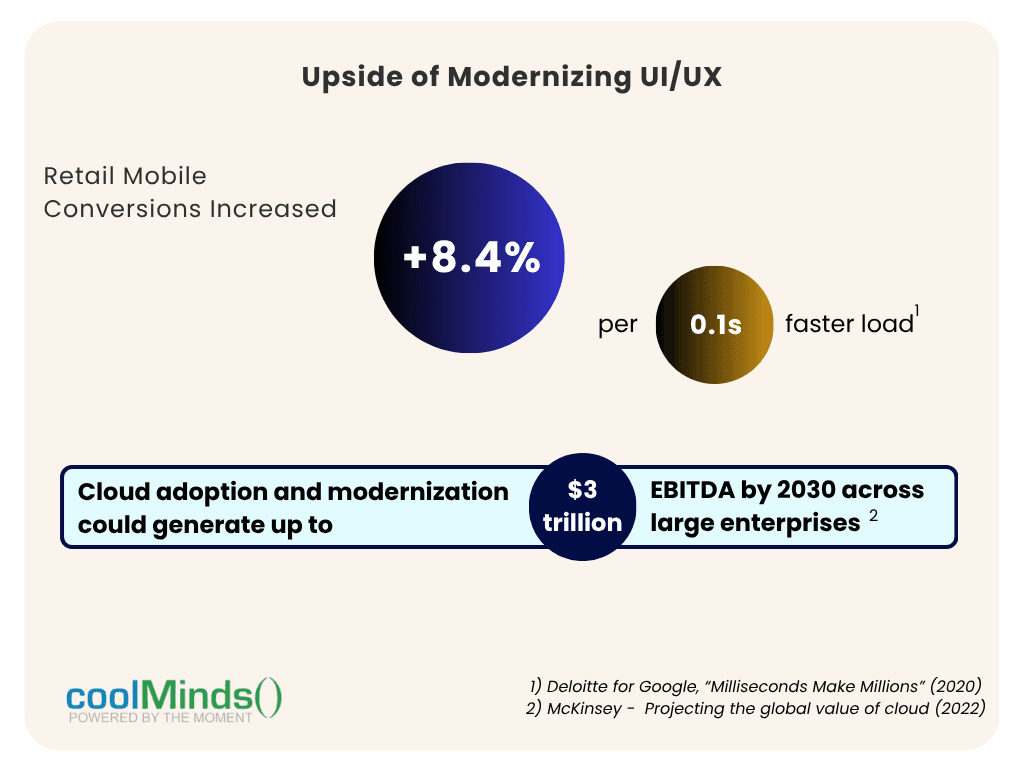
While modernizing outdated client interfaces is often necessary, the traditional agency narrative surrounding front-end rewrites conceals significant operational risks. In practice, codebases do not exist in a vacuum. Decades of accumulated business logic, unwritten edge cases, and coupled backend API dependencies turn straightforward framework upgrades into prolonged, high-cost engineering challenges.
Understanding the hidden structural costs of front-end modernization is essential to executing a migration strategy without blowing your budget or stalling your product roadmap.
The 4 Hidden Costs associated with Front-End Rewrites
When engineering teams estimate a front-end rewrite, they typically calculate cost based on surface-level components: pages, forms, modals, and design tokens. However, the majority of the actual effort is spent navigating invisible architectural friction.
- 1. The "Undocumented Business Logic" Cost In legacy applications built on server-rendered templates or early JavaScript libraries, business rules are rarely neatly isolated. According to the Project Management Institute (PMI), 37% of software project failures stem directly from inaccurate or missing initial requirements. When legacy code is the only documentation, reverse-engineering edge cases dramatically inflates scope. That figure covers projects generally. In a legacy front-end the requirements often exist only in the code, which makes the risk sharper.
- 2. The Coexistence Cost Enterprise applications cannot be down for six months. In an incremental migration, old and new front-ends run side by side. That means reverse proxies, routing rules, shared authentication (bridging server sessions with OAuth2/JWT), dual CI/CD pipelines, and two sets of monitoring. This is the cost of the safer way, not a flaw in it. This is a real engineering effort that needs to be budgeted.
- 3. The State Management Cost Converting from markup-based code to component-heavy code is mostly mechanical. Re-architecting data flows is not. Legacy pages rely on implicit global state: values on the window object, data read from the DOM, sticky server sessions. Modern frameworks expect explicit state management, whether in stores, with signals, or through server-driven state. Wrapping legacy logic in new components without rethinking the state can lead to unnecessary re-renders, race conditions, and fragile synchronization bugs.
- 4. The Toolchain Churn Cost The ecosystem around your framework is evolving. In February 2025, the React team deprecated Create React App due to a lack of active maintainers and recommended frameworks or build tools like Vite. That default toolchain was introduced in 2016, not even ten years ago. Newer architectures also bring new security exposure: in December 2025, the React team announced a critical unauthenticated remote code execution vulnerability in React Server Components, followed by additional denial-of-service and source-exposure issues within days. The lesson is not “don’t use modern stacks.” Plan for upgrades, patching, and dependency maintenance during the project — not just at the beginning.
Costs Teams Often Miss Entirely
- SEO and Core Web Vitals: moving server-rendered pages to a client-side SPA can hurt crawlability and load performance if server rendering is not planned.
- Accessibility: rebuilt components can regress on WCAG compliance. For European audiences, check obligations under the European Accessibility Act.
- Security model changes: shifting from server sessions to browser-held tokens changes your threat model.
- Localization and browser support: legacy pages often carry i18n and older-browser handling that nobody remembers adding.
- Retraining: existing teams may need new skills, and hiring for them takes time.
What the Data Says (and Doesn’t)
No study measures front-end rewrites specifically, so treat these as directional evidence about large technology programs. Overruns scale with size and duration. McKinsey and Oxford’s study of more than 5,400 IT projects found that large projects (over $15 million) ran 45% over budget and 7% over schedule on average while delivering 56% less value than predicted, and that each additional year of duration added about 15% to cost overruns. Most front-end programs are smaller than $15M. The duration effect is the useful part, because it argues for shipping in increments.
Smaller scope succeeds more often. The CHAOS data reporting shows that 61% of small projects succeeded versus 6% of the largest ones. As a side note, the report defines success on six attributes — OnTime, OnBudget, OnTarget, OnGoal, Value, and Satisfaction. The data is proprietary and its methodology is debated, so read it as a signal rather than a precise rate.
Transformations often miss targets. BCG’s study of 895 companies found only 30% of digital transformations met or exceeded their targets and delivered sustainable change. BCG ties success to six factors, among them effective progress monitoring and a business-led modular technology platform. That is a leadership and governance story, not just a coding one.
Your Options Compared
| Approach | Best when | Main trade-off |
|---|---|---|
| Full rewrite ("big bang") | Small app, low domain complexity, a firm cutover window | Feature freeze, lost domain knowledge, all-at-once risk |
| Incremental (Strangler Fig pattern) | Large, business-critical app that must stay live | Coexistence costs: proxy routing, dual pipelines, shared auth |
| Modernize in place (progressive enhancement, targeted UI refresh) | Backend and templates are sound; the pain is UX or speed | May not deliver the full developer-experience gains |
| Leave it alone | Stable, low-change, low-risk internal tools | Ongoing cost of aging tech: hiring, security, compliance |
A full rewrite is not always wrong, and incremental migration is not free. Choose based on app size, change rate, and risk tolerance.
A Practical Guide
- Step 1: Audit business logic before writing code. Map data flows, validation handlers, and third-party scripts. Record every edge case as an explicit functional spec.
- Step 2: Migrate incrementally with the Strangler Fig pattern. Put a gateway or reverse proxy in front of the application. Move high-value routes first, such as checkout or dashboards, and leave low-priority pages on the old stack until they are due for change. Budget for the proxy and dual-stack overhead described above.
- Step 3: Isolate state behind an API layer. A Backend-for-Frontend (BFF) or GraphQL layer keeps data fetching and business rules out of the view layer, so future framework changes are cheaper. It is another component to build, own, and secure, so scope it deliberately.
- Step 4: Lock in behavior with characterization tests. Write end-to-end tests (for example with Playwright or Cypress) against the legacy app’s critical journeys first, then run them against each migrated route. Add visual regression checks. Coverage is only as good as the journeys you test, so prioritize by business risk.
- Step 5: Migrate in slices you can roll back. Rollback is fast only if data, sessions, and schemas stay compatible with the legacy view. Design for that from the start.
When Not to Modernize the Front-End
Skip or defer it if the application is stable, rarely changes, and has no security, accessibility, or hiring pressure. Modernize when end-of-life frameworks, compliance requirements, talent scarcity, or measurable UX and performance losses are costing more than the migration would.
How CoolMinds Approaches Front-End Modernization
The hidden costs above are manageable when the target state is designed for them. Our approach pairs incremental migration with a shared front-end foundation built on four pillars:
- Brand-consistent UI design systems. We define color, typography, and component tokens in Figma and carry them into code. Applying them to both legacy and new screens during migration helps users experience one product, not a visible seam between old and new.
- Responsive, device-optimized UI/UX. Layouts, input modes, and platform conventions are designed per device from the start, so modernization also fixes the mobile and tablet gaps legacy interfaces usually have.
- Maintainable single codebases. Shared components and business logic across web, mobile, and tablet mean features and fixes ship once, reducing duplicated technical debt.
- Performance optimization. Code splitting, asset optimization, efficient state handling, and Core Web Vitals monitoring are built in from day one, not left for a final polish pass.
Frameworks we build with: Angular · React · Flutter
Want the full picture of our design and delivery capabilities? See our Cross-Platform UI/UX Development service. Cross-Platform UI/UX Development
Not sure whether your front-end needs a rewrite, a phased migration, or just targeted fixes?
Get a free $0 technical consultation with the CoolMinds modernization team. We'll help you scope the hidden costs and choose the approach that fits your risk profile.
Book Your Free $0 Technical Consultation